Article
Design system: the base camp for your product team



- By
- Fabienne Elm, Philipp Siekmann & Markus Brendel
- Reading time
- 8 minutes
- Updated
What is traditionally covered by a style guide requires a more comprehensive approach in digital product development. Design, concept, development: all these perspectives, and especially how they interact, must be taken into account. This article explains why that’s the case and what a design system can do for your product team, your brand, and the user experience. You’ll also learn why a design system is a real boon for budget managers, even without a directly measurable ROI.
What is a design system?
A design system is an organizational model for the collaborative and consistent design of a company’s digital presence. As a comprehensive repository of knowledge, it simplifies and standardizes the work of everyone involved.
In addition to design principles and documentation, it also includes very specific implementation guidelines. Interface components, code snippets, voice and tone examples, and design guidelines, ranging from colors to spacing rules, are all documented in one central location and accessible to the entire company.
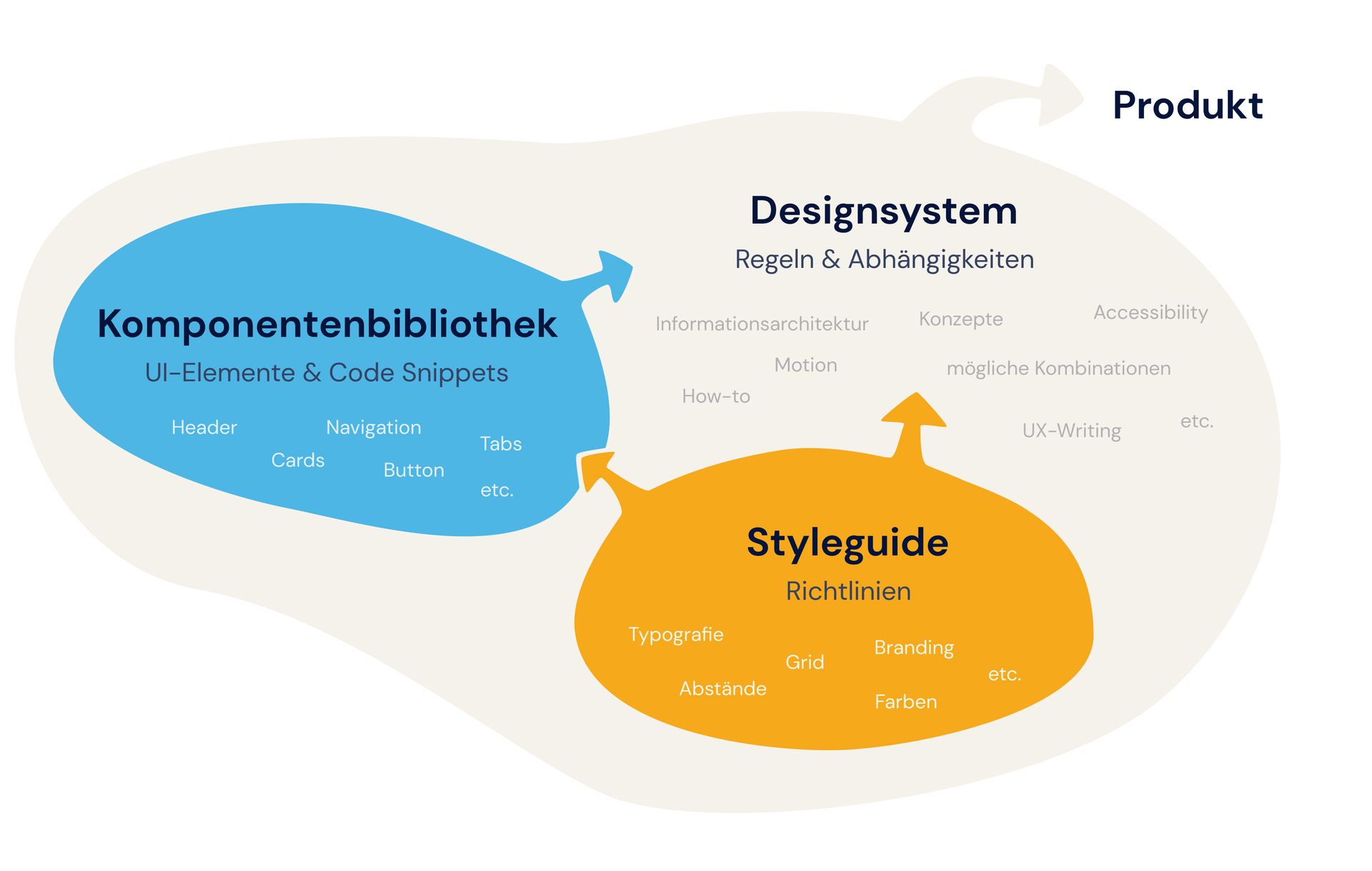
The focus is on its systemic nature: The design system brings together the perspectives of UI designers, UX designers, and developers. This is where it fundamentally differs from the traditional style guide, which primarily contains design rules such as branding, colors, typography, etc. In a design system, design is viewed in a particularly holistic way, and technical implementation is factored in. Style guides, voice and tone guides, pattern libraries, code usage guidelines, component libraries: everything is part of the system. This system not only incorporates these three perspectives but also interconnects them. For example, components are described both in the form of code and through design guidelines. Every element is defined in its entirety.
A concrete example: Notifications can be described conceptually (what types exist and when each type should be used), visually (what they look like), and technically (primarily through code). In addition, all thematically related areas are linked together within the design system. Whoever needs information about notifications receives not just a snapshot, but a comprehensive overview.
And what isn’t it?
A design system isn’t a one-size-fits-all solution. There will always be unique requirements and special cases where the rules don’t apply exactly as written. However, a good design system is flexible and makes it possible to quickly and easily apply lessons learned from one context to other scenarios.
This is what makes design systems so powerful
To understand the benefits of a design system, imagine it as the base camp for a mountaineering group: This is where the journey begins for the entire team. It’s a place for coming together, exchanging ideas, and preparing as a group. At the same time, it’s already the first step on the path to the goal. No one starts from scratch. The goal is already in sight, the direction is clear, even if the paths to the summit may vary. At base camp, every team member also receives the tools they need for the ascent: everything that makes the collective effort easier and safer. And most importantly: Everyone can return to base camp at any time if things get dicey or don’t go as planned. Routes, equipment, and strategies can always be adjusted and optimized.
Overview of the benefits:
- Efficiency: Product development speeds up, especially in the long run. That’s because every team member can achieve more with less effort. Instead of reinventing the wheel every time, you can rely on existing components that have already proven themselves and work within the overall system. There’s no need to spend time searching for design guidelines. Everything can be found in one place, and cross-links make searching even easier. This is also a major advantage when onboarding new team members or external service providers.
- Consistency: As a single source of truth, the design system ensures that concepts and design remain consistent across all channels and products. Even as the design evolves over time, it remains recognizable as part of the brand identity.
- Empathy: The design system fosters mutual understanding and thus serves as an excellent foundation for collaborative work. It encourages us to consistently see things from others’ perspectives and to understand their pain points and approaches. Every design element is viewed as part of a larger whole that only works when everything fits together seamlessly.
- Scalability: The design system includes only elements that are reusable and modular. This makes the system scalable. Whether a company offers five or 100 products doesn’t make much of a difference to the design system. Design changes can be implemented quickly across the entire company, and lessons learned can be rolled out across the entire system.
- Motivation: The team can skip monotonous, repetitive steps and has more time for what makes the specific context unique and defines it.
- Happy users: And let’s not forget: a design system helps those who ultimately use the design. It ensures a consistent user experience across all touchpoints and makes the software easier to learn.
Challenges and how to overcome them
To ensure that all the positive effects come into play, you should be aware of a few pitfalls. The good news is that they’re all easy to solve.
Overkill?
Challenge: Setting up and maintaining a design system takes time and money. At first, it takes significantly more effort to develop all components in a way that’s flexible and modular enough to meet the requirements of a design system. This is especially worthwhile when growth is on the horizon, when multiple teams are collaborating, and when there are various products under a single core brand. However, if none of these conditions apply initially and you decide to forgo a design system, this can lead to problems down the road. The later you implement a design system, the more complex and time-consuming it becomes.
Solution: Start small at the beginning and let the design system grow along with you. “Good enough for now, safe enough to try.” This way, costs are kept to a minimum, and if in doubt, you’ll always have something to build on. A design system doesn’t have to be perfectly planned from the start or set up with a dedicated team; sometimes it just happens organically until it makes sense to dive deeper into it.
Losing your blank canvas?
Challenge: Too many rigid rules can stifle creativity, and extensive design systems can feel overwhelming.
Solution: Be careful not to overcomplicate the design system. It shouldn’t become a random repository, but should truly contain only reusable elements: not too specialized, not too complex, and self-contained. Design the system to be open and dynamic. The content serves as flexible starting points that can be discussed and adapted at any time. That said, designers rarely work entirely without rules, whether those rules are written down or exist only in their minds.
Does it really make a difference?
Challenge: It’s difficult to quantify the ROI of a design system; its effects aren’t directly measurable. Especially in the beginning, the effort involved seems high relative to the immediate benefits.
Solution: In the long run, a design system delivers immense efficiency gains, which then have a direct impact on revenue. Once the initial costs have been recouped, the cost-benefit curve rises ever steeper in favor of efficiency. Added to this are the positive effects on the brand, which in turn impact the company’s value. You can learn more about the ROI of UX in Christian’s article: ROI of UX initiatives: Why investing in a good user experience pays off.
Competing initiatives?
Challenge: Especially in a corporate setting, multiple sets of guidelines can circulate simultaneously, which can undermine one another and cause confusion.
Solution: Before you start thinking about a design system, find out exactly what’s already out there. Bring the key stakeholders to the table and pool all your ideas together. In one of our projects, a new corporate identity (CI) was being developed within the company at the same time we were creating our design system. We collaborated closely and ultimately created a consistent, cohesive whole.
Gathering dust?
Challenge: A design system remains an end in itself if it isn’t put into practice. It must be used and further developed company-wide and become ingrained as a mental model.
Solution: The lifeblood of any design system is buy-in from C-level leadership. Additionally, acceptance increases when different internal departments feel a sense of ownership and are actively involved. Even more essential: The design system must be continuously optimized to ensure it actually makes work easier and is simple to use.
Here’s how it’s done (or done completely differently)
In principle, a design system can be developed at any stage of the project, but the general rule is: the sooner, the better. At the outset, all relevant building blocks are gathered, and a mindset for collaborating on the system is established. Depending on the scope, a small team can be assembled to focus exclusively on the design system, or the task can be handled by a community of practice or guild alongside members’ primary jobs. In the latter case, everyone involved typically meets once or twice a week to align goals and perspectives. At the same time, the team responds agilely as soon as a question or problem arises. User feedback is also taken into account. There’s no clear “how-to” guide for setting up a design system; every design system is different and depends on the actual requirements and available resources. The tools used also vary. In most cases, a design system can be accessed via a single URL. Good examples include Atlassian and IBM’s Carbon Design.
Conclusion
The benefits of a design system are so powerful that we create and maintain one in the vast majority of our projects. It may start out as just a few basic rules and, depending on requirements, grow into a massive undertaking that connects dozens of teams. The greatest strength of a design system lies in its shared foundation, the interconnection of different ways of thinking and working. As the trend moves toward ever-closer integration between UIE, UI, and UX design, the design system will certainly be able to realize even more of its potential in the future and become a fundamental component of the product development process.
Our experts
Fabienne works as a senior UI designer at UX&I. She has an excellent eye for design. Her designs are celebrated not only internally but also by users.
Philipp is a UI engineer. Thanks to his previous experience at an agency, he brings extensive industry knowledge to the table. As a senior UI engineer, Philipp is passionate about creating user-centered interfaces using the latest technology. We’re absolutely thrilled with how fast he works.
Markus is a senior UX consultant and has been part of UX&I in Düsseldorf since 2018. He has been involved in the design of digital products since 2009. Markus particularly enjoys challenging tasks, feels right at home in the role of facilitator, and loves working in interdisciplinary teams.